Selasa, 13 Januari 2009

Slacker Radio App for iPod Touch and iPhone

Last week at the Consumer Electronics Show in Las Vegas, the U.S.-based interactive Internet radio service company Slacker Radio released Slacker Radio for BlackBerry, and announced that an iPhone cousin was coming out as soon as Apple approved it. You don't have to wait any longer. Slacker today has released its new Slacker Radio application for the iPhone and iPod touch.

Similar to services provided by Pandora Radio and Last.fm, Slacker gives users access to over 100 stations pre-programmed by radio professionals, along with the ability to pick stations based on genre, artist, or to create new stations based on a specific band or artist, which also contain music from similar artists as recommendations.
Show me more...
The app makes the most of Slacker Internet Radio's customary dark, good looks on the iPhone's tall display. The album art is much more prominently displayed here than on the BlackBerry, and the controls take center stage. Slacker for iPod touch allows the user to be able to fine-tune a station while it plays, and pick a new station without terminating the current song.

Choosing the next station is incredibly easy--your favorite and custom stations are at the top of a vertically scrolling list, with a search option, top stations, and the Slacker spotlight just below. You can keep scrolling down to flick through the genres. Slacker Radio for iPod Touch 2G and iPhone is available as a free download from the App Store.

Senin, 12 Januari 2009

Contour Flick iPod Touch 2G Cases

Contour Flick iPod Touch 2G Cases
The Flick cases iPod touch 2G are made from two pieces of colored hard polycarbonate joined by a recessed rubber hinge that allows the case to be partially opened for docking.
Show me more...
From the streamlined, low profile design to the slide and Flick mechanics of the case, the Flick could not get any easier or natural to use. Just slide it and Flick it. The Contour Flick, re-writing the manual on case technology.

This iPod touch 2G case is available in blue, black, green and orange colors and sells for $35. Amazon has a great deal on the Contour Flick case. Move over the link to get the latest price.

Complete Accessibility
Total access to each and every control on the touch.

The Color Case Collection
Vivid colors to fit your mood and your touch. Colors include blue, black, green and orange.

Dockability
Simply Flick open the case and dock the ipod touch. No case removal necessary.

Specifications
Weight: 0.5 oz./14.0 g

What's in the Box
-Contour Flick case for iPod Touch 2G
-Instruction booklet

Warranty
One-year limited

Also check out the Contour iSee iPod Touch 2G Cases

Jumat, 09 Januari 2009

SongGenie App fixes missing iTunes track information

SongGenie is the latest app from equinux that aims to make your iTunes library a little more organized and useful. If you are one of those who has a lot iTunes tracks, then you could be having many tracks with partial or no metadata applied to them. Meaning tracks whose track name isn’t filled in, the album information is missing, or the artist is unknown.
Show me more...
SongGenie is your "genie" that can fix this problem. SongGenie automatically combs your archive for tracks with incomplete or missing descriptions. The first time you launch SongGenie, it starts scanning through your iTunes library, identifying songs that are either missing information or where the information included in the track doesn’t look right (for example, the name starts with a number) and collects all those tracks in a ‘Songs with missing information’ list.

You can then nagivate through this list and either have SongGenie identify each song individually or hav all of them identified together. SongGenie creates an acoustic fingerprint of every track. Using this particular fingerprint, it determines which track to work on and intuitively inserts the correct information in the user interface. But you can still first listen to the songs in iTunes before applying the suggested changes.

Equinux's SongGenie for iTunes costs $29.95 and requires Leopard (OS X 10.5).

Rabu, 07 Januari 2009

How to restore when wrong passcode disables your iPod Touch or iPhone

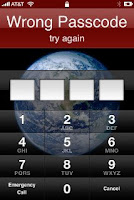
As you know iPhone and iPod touch allow you to set a passcode to be entered when powered on or when the wake button is pressed. And when you enter the wrong passcode you'll see a screen that says "Wrong Passcode, try again." If you enter the wrong passcode too many times, you'll see a message that says "iPod is disabled" and to try again late. The screen on the iPhone will read as "iPhone is disabled."
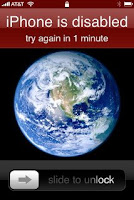
If you repeatedly enter the wrong passcode, iPhone or iPod touch will be disabled for longer intervals, before you can try again. After too many unsuccessful attempts, you won't be able to try again until you connect to the computer you normally sync with. Show me more...

Note that starting with iPhone 2.1 software, there is a setting to cause the device to erase itself after 10 consecutive incorrect password attempts. This setting is off by default. It can be turned on by tapping Settings > General > Passcode Lock after you enter a correct passcode.

If you cannot remember the passcode, you will need to restore your device on the computer that was used to originally sync the iPhone or iPod touch so that you can reset your passcode and resync the data from the device (or restore from a backup).

If you restore on a different computer that was never synced to the iPhone or iPod touch, you will be able to unlock the device for use and remove the passcode but your data will not be present.

Restoring your iPhone or iPod touch

Restoring your device will erase all data from your iPhone or iPod touch, including songs, videos, contacts, photos, calendar information, and any other data. All iPhone or iPod touch settings are restored to their factory condition.

Whenever you restore your iPhone or iPod touch, Apple highly recommends that you perform a sync prior to restoring in order to back up any changes since your last sync. If you have movie rentals on the device that you haven't finished watching, restoring using iTunes will delete the movie rental and will not be recoverable.

Use the following steps to restore your iPhone or iPod touch:
  1. Make sure you have the latest version of iTunes installed and running before attempting to update.
  2. Connect your iPhone or iPod touch to your computer.
  3. Select your iPhone or iPod touch when it appears in iTunes under Devices.
  4. Select the Summary tab.
  5. Select the Restore option.
  6. When prompted to back up your iPhone or iPod touch's settings before restoring, select the Back Up option. If have just backed up the device, it is not necessary to create another.
  7. Select the Restore option when iTunes prompts you (As long as you've backed up your device, you should not have to worry about restoring your phone).
  8. Once the restore process has completed the iPhone or iPod touch restarts and displays the Apple logo while starting up. NOTE:For the iPhone only, after a restore, the iPhone displays the "Connect to Activate" screen. During this period you must continue to keep your device connected to complete activation and make sure you are connected to the internet.
  9. The final step is to restore your iPhone or iPod touch from a previous backup. So on the setup screen select the back up you want for your iPhone or iPod touch and select the Continue button in order to complete your device's restoration.

New Ipod Touch HD Coming This Fall

You got Ipod Touch Gen 1 or 2 and I bet many of you are pleased with for what it can do. But for some of us Apple thought building Giant Ipod Touch HD this fall. Heard rumors that it will contain Flash so not only you can view Youtube videos but also other video websites such as Hulu for example.


Checkout more news at TechCrunch

Selasa, 06 Januari 2009

iTunes songs are now DRM-free and will cost only 69 cents

At Macworld Expo today, Apple's Phil Schiller announced that apple has signed agreements with all the major music labels to offer their music in a DRM-free format on the iTunes Store. Like prior iTunes Plus tracks, all music will now be sold in DRM-free, 256kbps AAC format. All free of burn limits and digital rights management (DRM). So iTunes Plus music will play on iPod, Apple TV, all Mac and Windows computers, and many other digital music players.
Show me more...
Currently, 8 million tracks are available as DRM-free iTunes Plus songs, with 2 million more DRM-free songs slated to become available by the end of the quarter. That will make all of iTunes' 10 million tracks DRM-free, the largest music store library on Earth. Apple will also offer an easy upgrade for users to the new iTunes Plus tracks.

Apple also announced the new capacity for iPhone 3G users to download songs over the 3G mobile network, in addition to the WiFi downloads that were formerly the only way to access iTunes from the mobile. There is no extra charge for downloading tracks over the mobile network, as there is with some other services.

Starting in April 2009, studios will be able to release songs on iTunes at three different prices: 69 cents for back catalog tracks, 99 cents for standard songs, and $1.29 for new or popular releases. Apple has staunchly resisted multiple track prices in the past in order to keep music in iTunes priced simply and consistently. Music labels have just as stubbornly pushed for multiple pricing tiers.

Apple patents iPod touch and iPhone friendly gloves

Addressing the complaints of nearly every iPhone owner in a northern climate, Apple has filed for a patent that would cover a means of using a multi-touch device with gloves.

As cold-weather users of the iPhone or iPod touch may already know, the devices’ capacitive touch screens don’t work with most insulated gloves, as they block the electrical response needed to operate the screen.

Apple’s patent filing describes a pair of gloves with a second inner layer that would simulate the electrical feedback of human fingers, and matching openings on each fingertip to allow the inner layer to be exposed when in use. As with all Apple patents, this filing does not necessarily represent any future product release from Apple, but offers evidence of the company’s research in this area.

 
Design by Free WordPress Themes | Bloggerized by Lasantha - Premium Blogger Themes | Lady Gaga, Salman Khan