02.57
02.57
 ipod touch review

Transfer music from ipod to itunes
Here are the steps for transfer music from ipod to itunes or computer.
Make sure your computer is installed with itunes.
Step 1
Now connect your ipod to computer via USB cable.
Computer may open itunes and ask you that you want to sync your ipod.
Click on NO.
2)
Your ipod is detected as a one of the drive may be as a G: drive on your computer. Open my computer.
3)
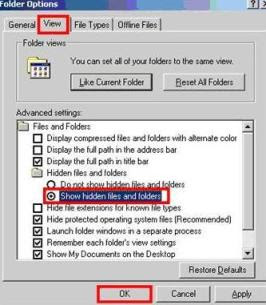
You need to unhide file and folder. Here are the steps for windows vista and xp.

In windows XP
Open ipod drive
Click on tools folder options
View tabs and select show hidden files and folders.
Apply ok.
In windows vista:
Open the ipod drive and click on organize
folder and search options
View show hidden files and folders.
Step4
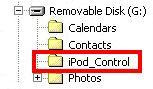
In ipod drive you will find a folder called ipod_control. Open ipod_control folder and you will see : 1. calendars 2. contacts 3. ipod_control 4. notes 5. photos

5)
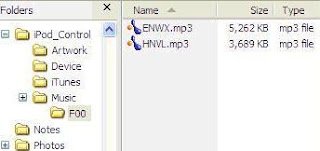
Open the ipod_control folder Then open the music folder > Copy entire folders (it should like these: F00, F01 ...) onto your computer. Paste it to somewhere on desktop. This is the music that you want to transfer from ipod to itunes or computer.

6)
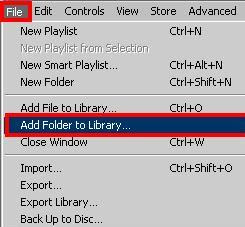
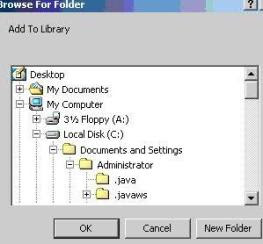
Open itunes and insert desktop folder into: library Music
7)
Now sync your ipod with this computer you will not lose any of your music.
Here are the steps for transfer music from ipod to itunes or computer.
Make sure your computer is installed with itunes.
Step 1
Now connect your ipod to computer via USB cable.
Computer may open itunes and ask you that you want to sync your ipod.
Click on NO.
2)
Your ipod is detected as a one of the drive may be as a G: drive on your computer. Open my computer.
3)
You need to unhide file and folder. Here are the steps for windows vista and xp.
In windows XP
Open ipod drive
Click on tools folder options
View tabs and select show hidden files and folders.
Apply ok.
In windows vista:
Open the ipod drive and click on organize
folder and search options
View show hidden files and folders.
Step4
In ipod drive you will find a folder called ipod_control. Open ipod_control folder and you will see : 1. calendars 2. contacts 3. ipod_control 4. notes 5. photos
5)
Open the ipod_control folder Then open the music folder > Copy entire folders (it should like these: F00, F01 ...) onto your computer. Paste it to somewhere on desktop. This is the music that you want to transfer from ipod to itunes or computer.
6)
Open itunes and insert desktop folder into: library Music
7)
Now sync your ipod with this computer you will not lose any of your music.