Tampilkan postingan dengan label Apple-iPod-Touch-Features-Overview. Tampilkan semua postingan

Senin, 06 September 2010

How to make FaceTime video calls on iPod Touch 4G

How to make FaceTime video calls on iPod Touch 4G

As you all know by now, one of the coolest new additions to new iPod Touch 4G is the FaceTime feature that allows you make video calls to friends and family across the globe. The FaceTime feature allows you make video calls to other iPod Touch 4G and iPhone 4 over WiFi. Read more...

This feature is made possible by 2 new cameras introduced on the iPod Touch 4G. One on the front, which focuses on you. And one on the back, which focuses on what's in front of you. Note that FaceTime lets you switch between them at any time during a video call.

How to accept & make FaceTime Video calls on iPod Touch 4G

  1. All you need to get started is an Apple ID and an email account. You can choose an email account you already have or, if you prefer, set up a new one.
  2. Make sure your iPod Touch 4G is connected over a Wi-Fi connection which is the mode of communication for the FaceTime Video. (If you want more info on iPod Touch Wi-Fi settings visit How to connect and manage iPod Touch Wi-Fi).
  3. Making the actual FaceTime video call is as simple as it gets:
    1. Just tap the FaceTime app.
    2. Find the person you want to call.
    3. An invitation pops up on their iPod touch or iPhone 4 screen asking if they want to join.
    4. When they accept, FaceTime begins.
  4. Receiving a FaceTime Video Call:
    1. If somebody wants to start a video call with you, you'll receive an invitation - along with a vibrating alert - on your iPod touch asking you to join.
    2. Simply tap Accept, and the video call begins.

Rabu, 01 September 2010

iPod Touch 4G Features & Gallery

iPod Touch 4G

Apple today unveiled the next generation iPod Touch called the iPod Touch 4G which some awesome new features including the 2 cameras front and rear, Game Center, FaceTime video chat and much more. Here is a look at some of the cool new features with pictures of the new iPod Touch 4G. Read more...

iPod Touch 4G New Features

iPod Touch 4G Design

The new iPod Touch 4G is more curvy and less thinner than its predecessor. It is now a mere 7.2 millimeters thin and features a engineered glass front and stainless steel back that feels sleek and smooth in your hand. The display has been revamped to the iPhone 4 like Retina display consisting of a 960-by-640 backlit LCD. It packs 326 pixels per inch, making it the highest-resolution iPod screen ever.

iPod Touch 4G

It is powered by Apple's own A4 chip set and also has a built-in three-axis gyroscope. The gyroscope when coupled with the accelerometer, makes the iPod touch 4G capable of advanced motion sensing such as user acceleration, full 3D attitude, and rotation rate.

2 Cameras on the iPod Touch 4G

Apple has included not one but 2 cameras: a HD 720p video recordable rear facing camera and a front-facing camera for making FaceTime video calls over Wi-Fi to other iPod Touch 4Gs and iPhones. The front camera can also be used to shoot self-portraits. You can record video in low-light settings, thanks to the advanced backside illumination sensor.

iPod Touch 4G

iMovie App 

With the 2 new cameras you can Make eye-catching HD movies anywhere with iMovie, the fun, feature-rich video editing app that's designed for the new iPod touch. You tap to add or record video to your project. Drag to trim the length of clips, and swipe to split them. Pinch to zoom the timeline and get a closer look. It's a completely natural way to make a movie.

iPod Touch 4G

iPod Touch 4G Game Center

Apple has introduced a new app called the Game Center that allows you to get on to or create a gaming network with your friends. You can invite friends to join and totally dominate them. You can also look at how your score ranks against your friends and other players of each game. You can compare game achievements with your friends.

iPod Touch 4G

Rabu, 09 September 2009

Whats new in iPhone OS 3.1 update

iphone-os-3.1-genius-mixesiphone-os-3.1-genius-apps

Apple today also announced the availability of the new iPhone 3.1 Software Update for iPod touch which gives you new features that make watching video, playing games, and listening to music even more fun. Show me more...

This updates among others includes a new feature called "Genius for Apps". iPhone OS 3.1 with iTunes 9, utilizing the Genius technology introduced in iTunes 8 will be able to make recommendations based on the apps the user already owns through the Genius for Apps feature.

In addition, iPhone OS 3.1 adds the ability to buy and directly download pre-made ringtones. The new offering will launch with 30,000 ringtones from all four major labels, priced at $1.29 each. Accessible via the More tab in the iTunes application, the Ringtones section lets you browse by featured ringtones, top tens, or genres. You can preview any ringtone just as you would a song or purchase it for $1.29, at which point it will be downloaded to your device and appear automatically in Settings -> Sounds -> Ringtone, along with the rest of your ringtones

Finally, iPhone OS 3.1 adds the ability for iPhone 3GS only users to access the Voice Control feature using a Bluetooth headset, the ability to redeem iTunes Gift cards, code, and certificates in the App Store, display iTunes account credits in the App and iTunes Stores, remotely lock an iPhone or iPod touch with a passcode via MobileMe, and a warning when visiting potentially fraudulent websites in Safari.

iPod Touch owners who have paid to upgrade to 3.0 will receive the 3.1 update for free. For those who have an iPod touch but have not yet upgraded to 3.0, can upgrade to 3.1 at a reduced price of $4.95.

Kamis, 06 September 2007

Apple iPod Touch Features Overview

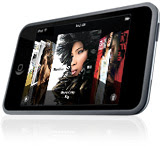
Revolutionary multi-touch interfaceRevolutionary multi-touch interface
iPod touch features the same revolutionary interface as iPhone.

Music: If a picture says a thousand words, think of what all the album art in your collection might say. With Cover Flow on iPod touch, you can flick through your music to find the album you want to hear. And when you do, a quick tap of the cover flips it over to display a track list. Another tap starts the music.

Photos: iPod touch holds up to 20,000 photos you sync via iTunes. Flick to scroll through thumbnails. Tap to view full screen. Rotate for landscape format. Or perform some sleight of hand by opening two fingers to zoom in. You can even play slideshows, complete with music and transitions. Set any photo as your wallpaper to personalize your iPod touch...with a touch.
Read more...

Gorgeous 3.5-inch widescreen displayGorgeous 3.5-inch widescreen display
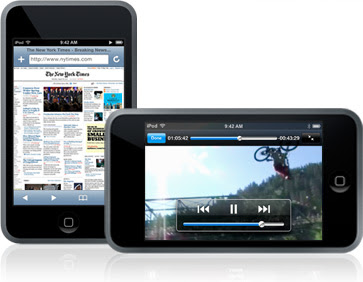
Watch your movies, TV shows, and photos come alive with bright, vivid color on the 320-by-480-pixel display The 3.5-inch display gives you video like nothing you’ve seen before on a portable device.

Watch your favorite movie. Catch up on television shows, anywhere. Enjoy video podcasts. Play music videos. All using multi-touch technology that lets you bring up onscreen controls and go widescreen (or back to full screen) with a tap.


Music downloads straight from iTunes
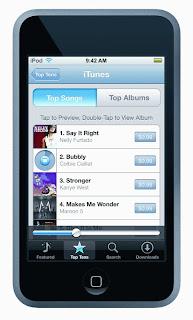
Shop the iTunes Wi-Fi Music Store from anywhere with Wi-Fi. With iPod touch, you can discover new music anywhere. Built-in wireless capability gives you access to the iTunes Wi-Fi Music Store, where you can buy songs with a tap.

Just find a Wi-Fi hot spot, tap the iTunes button, and browse new releases, top tens, and featured music — or search for anything. Listen to a 30-second preview. Click once to buy any song for 99¢ and it starts downloading instantly. It’s the fastest, easiest way to build a digital music collection.

Starbucks Music: You walk into a Starbucks. Order your latté. While you wait, you hear a song wafting from the loudspeakers. You love it. So you get out your iPod touch and buy it over Wi-Fi. Just like that. The iTunes Wi-Fi Music Store on iPod touch tells you what’s playing in select Starbucks and lets you buy it along with other featured Starbucks content. So you can sip, shop, and listen.


Surf the web with Wi-Fi Surf the web with Wi-Fi
Browse the web using Safari and watch YouTube videos on the first iPod with Wi-Fi built in.

With Apple’s Safari browser built in, iPod touch is the only iPod that gives you wireless access to the web, everywhere you go. See websites the way they were designed to be seen.

Sync your bookmarks or add a few as you go. Search the web using the touchscreen keyboard. Zoom in and out by tapping the multi-touch display.

Got a bit of a YouTube addiction? iPod touch feeds it from anywhere with a special YouTube player built right in. Watch featured videos, check out the most viewed, search for something specific, then bookmark your favorites for future reference. It’s all the fun of YouTube — pocket-size.

Apple iPod Touch Technical Specifications

Apple iPod Touch Gallery

Apple iPod Touch Reviews

 
Design by Free WordPress Themes | Bloggerized by Lasantha - Premium Blogger Themes | Lady Gaga, Salman Khan