Tampilkan postingan dengan label reading. Tampilkan semua postingan

Rabu, 24 Agustus 2011

iPads, Reading and Grade 1


Today was my first day using the iPads with the Grade 1 students. I was absolutely amazed at the level of engagement of the students and how interactive the apps were.


We decided to show them 2 new reading apps we got called Pop Out Peter Rabbit and iReading Stories Collection. Both were free and of course had lots of in-app purchases which can get expensive quickly if you are not careful. The books both had characters that you could touch and move around and made fun noises. The books had options to read it by themselves or have it read to them.


Overall, I thought it was a fabulous way to get students interested in reading. I am curious to find out if there is a better comprehension with all the interaction compared to just reading it. This will be a research question and some action research we'll hopefully investigate this year.


Here are couple of photos and videos from the class.


Minggu, 14 November 2010

Evernote-A gateway to collaboration


One of the main goals we've had with this iPod Touch pilot program is to try and ensure that the ipod touches are being used in the most effective ways possible. It is quite easy to fall into the trap of having the students play Math apps in a Maths center. However, if they were only doing this on computers, I would question whether computers were being used in the best way possible. Let me elaborate. Having students do low level thinking tasks in any situation, isn't always the best use of learning time. Glancing at Bloom's Taxonomy of Learning Domains, remembering and understanding are at the bottom of the totem pole so to speak. While creating is a much complex learning behavior, that is not to say that some knowledge isn't important but through creating, you are forced as a learner to apply what you know to new situations. If you don't know anything, it's hard to do that ;)


So applying this model to technology and learning, it doesn't take a rocket scientist to figure out that having students create work is a much more meaningful use of their time. Thus, we have been striving to find apps that allow for more creation rather than remembering.


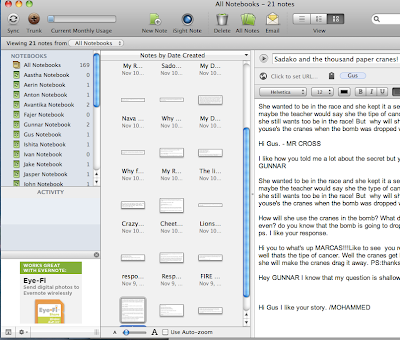
Evernote is just one of those apps. Grade 3 students have been using it to complete reading responses on books from their literature circles. We wanted students to be able to easily read other reading responses on "notes" that they created and respond to them. Much like a blog or Google Doc to create a shared discussion. Finally, after hours of persevering, we figured out that notebooks on Evernote are actually like folders. We created a new notebook for each student and ensured that they tagged their posts with their name. Students could immediately search for those notebooks and tags, read what they wrote and respond to it. A perfect way to collaborate on their learning! Here is an example of what they came up with:


While the challenge is to make it easier to see who wrote what, we will use color codes in the future to make this easier. Within 2 clicks, students could quickly read each other's reading responses. It was simple for the teacher to manage these posts because they came up immediately on his laptop computer.


We are now going to explore using voice notes as a way to differentiate these tasks.


Selasa, 27 Mei 2008

Playboy and Penthouse Free On Your iPhone

Zinio has released an optimized iPhone magazine reader which allows you to view full popular magazines for free.

And hurry up - this might not last long.


We heard about Zinio releasing an iPhone version of it's super-popular online magazine reader, so we decided to do a little investigation.

On their regular website Zinio.com offers a single issue for $4.99 - and allows you to preview the first 20 pages (which are 75% ads anyway)

The iPhone version - however - allows you to view the entire magazine - from start to finish - for free.

To access this site go to: www.zinio.com/iphone from your iPhone

If you don't own an iPhone but want to view these magazines anyway:

Simply change your user agent to iPhone on your Safari browser by following these super simple instructions.

Or

Do the same on your Mozilla Firefox browser by following these quick and easy instructions.

It's worth it.

Pictures are not scrambled on Zinio.


They offer tons of popular magazine titles:

US News

Playboy

Mens Health

MacWorld

Car and Drive

Penthouse

ELLE

Viv

PC Magazine

Kiplingers

Esquire

Technology Review

Popular Photography

...and more are constantly being updated

Senin, 12 Mei 2008

Google reader application for your iPod Touch.


Feeds - the native iPod Touch app for working with your Google Reader RSS feeds - based on Google reader API.


You can find this application in installer app via search.
Nice feature on the last installer version.

It is easy just goto all applications list and search for application your need.

 
Design by Free WordPress Themes | Bloggerized by Lasantha - Premium Blogger Themes | Lady Gaga, Salman Khan